Stats Dashboard
Navigate to Stats (in the sidebar, or /admin/stats) to see how your labs are used. The page answers three questions, top to bottom: what is running right now, what happened over a period, and how each lab did.
Figures are cached for up to 30 seconds per lab/period combination, so a just-completed change (a lab finishing, a workspace being created or closed) may take up to 30 seconds to appear here.
Lab and period filters
Two dropdowns sit in the page header. The page reloads as soon as you change one.

- Lab — All labs (default), or a single lab stack name to scope every figure on the page to that lab.
- Period — Last 7 days, Last month, Last 3 months, Last 6 months, Last year, or All time (default). The period applies to the period figures, the chart and the labs table, but never to the Right now line.
The month-based periods start at the beginning of a calendar month: on 10 October, Last 3 months covers 1 July to today.
Right now
One sentence says how many labs are running and how many workspaces are open in them. A running lab is a deployed lab whose cluster is still up — the thing that costs money. This line ignores the selected period.

- A workspace is open when it was created and has not been closed since, in a lab that is still running. Destroying a lab closes all its workspaces.
- If a lab failed to deploy, a red notice says how many did. Open the failed lab from the labs table to retry or remove it.
Period figures
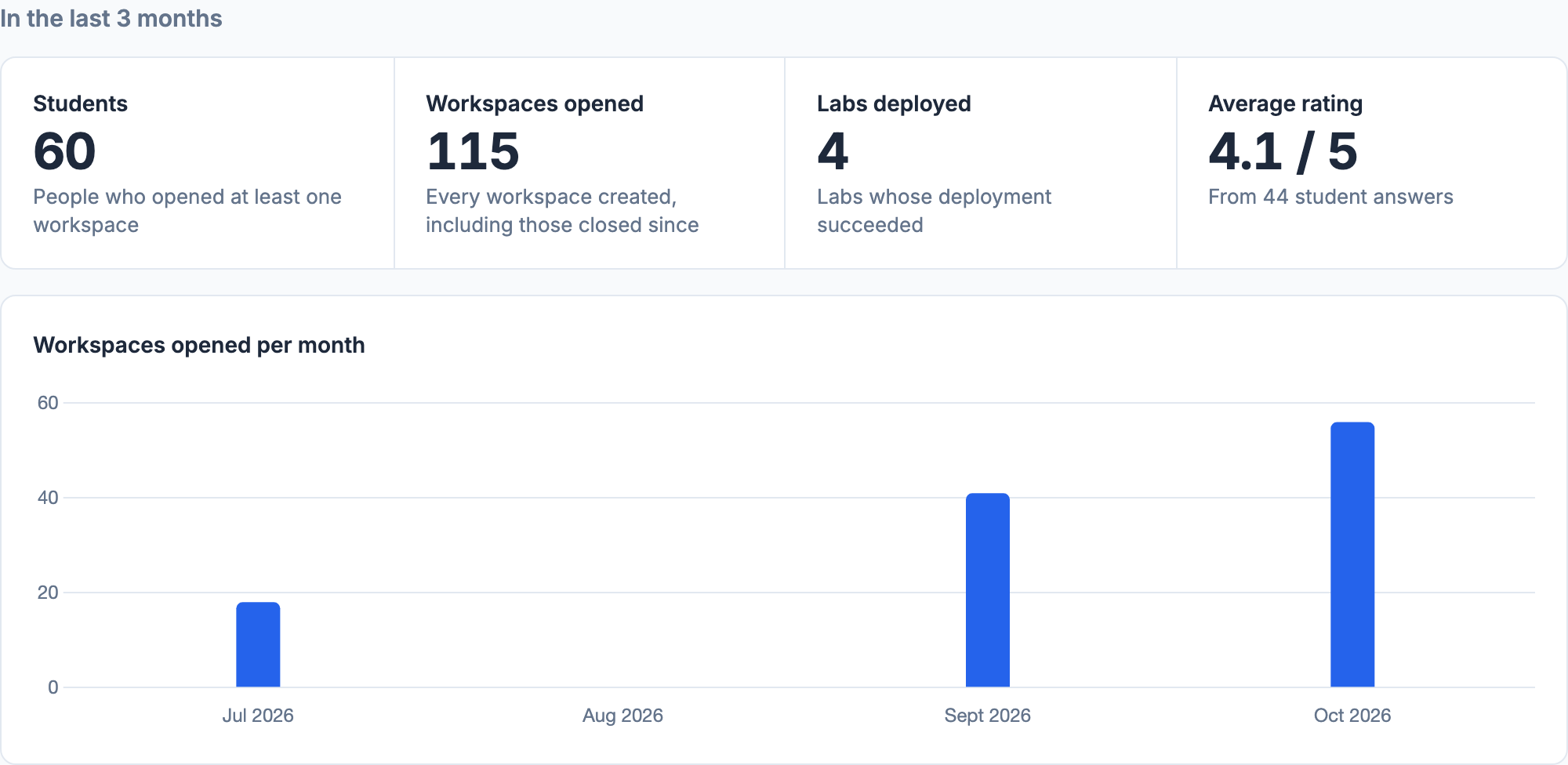
Four figures cover the selected period:
| Figure | What it counts |
|---|---|
| Students | People who opened at least one workspace. Someone who attends two labs, or opens two workspaces, counts once. |
| Workspaces opened | Every workspace created, including those closed since — whether closed by the cleanup service, an admin or the student. |
| Labs deployed | Labs deployed during the period whose deployment succeeded, including labs destroyed since. Failed deployments are not counted. |
| Average rating | The mean of the 1–5 ratings students gave during the period, with the number of answers. See Feedback. |
Activity chart
Below the figures, a bar chart shows workspaces opened over the period: one bar per day for Last 7 days and Last month, one bar per month for longer periods. A day or month without activity is shown as an empty slot. Hover a bar for its exact count. The bars add up to the Workspaces opened figure.
Labs
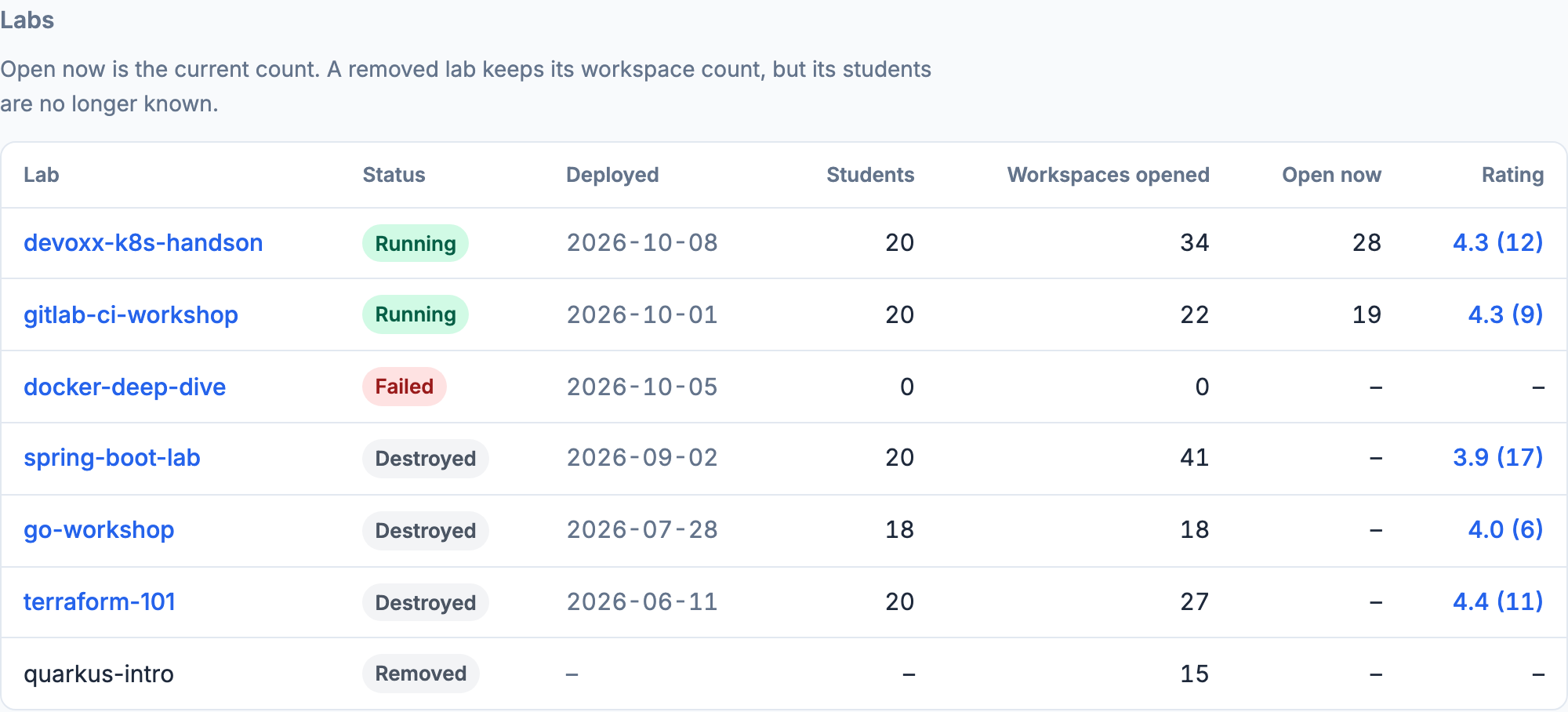
The table lists one row per lab:
| Column | Meaning |
|---|---|
| Lab | The lab's stack name. Click it to open the lab. |
| Status | Running (deployed and up), Failed (deployment failed), Destroyed (torn down), or Removed (deleted from the labs list). |
| Deployed | The date the lab was created. |
| Students | People who opened a workspace in this lab during the period. |
| Workspaces opened | Workspaces created in this lab during the period. |
| Open now | Workspaces currently open, for running labs only. Not affected by the period. |
| Rating | Average rating and number of answers during the period. Click it to read the lab's feedback. |
Running labs come first, then failed ones, then destroyed and removed labs, most recent first. Running and failed labs are always listed; a destroyed or removed lab is listed only if it was deployed or used during the selected period.
Removed labs
Deleting an old destroyed or failed lab drops it from the labs list, but not from the stats: its workspaces still count in Workspaces opened, in the chart, and in Labs deployed. The lab keeps a Removed row here, grouped by stack name. Two things are lost on removal:
- Students — who opened the workspaces is no longer known, so removed labs show
–and are left out of the Students figure. - Day-level detail — history is kept per month, so under a daily chart a removed lab's workspaces are shown on the 1st of their month.